

Networked DSP Audio Processor – The Central Brain of Modern Sound Systems
Networked DSP Audio Processor: Taking Control of the Signal Chain
When we design and tune a sound system, we all know one thing: the real ceiling of a system isn’t set only by the loudspeakers. It’s set by how well we manage the signal between the console and the amplifiers. That’s where a networked DSP audio processor acts as the “brain” of the entire setup.
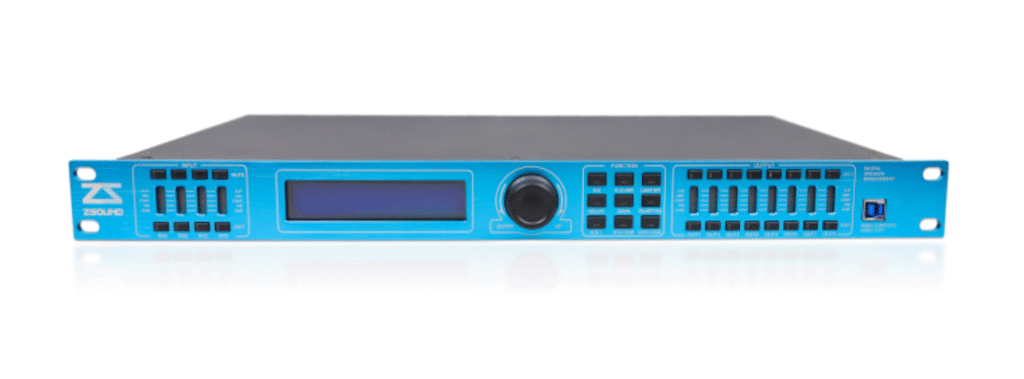
Processors like the XCA48 are built around a clear idea: put a 32‑bit DSP, 96 kHz sampling, and 24‑bit A/D–D/A conversion into a compact 2U frame, then expose it fully over USB, RS485, TCP/IP, and Wi‑Fi. This lets us pull all inputs and outputs into one place, and then manage them from a PC in the rack room, from a control booth, or even from another city.
Below, we’ll look at what a networked DSP audio processor really does for professional audio engineers, from hardware specs to real project workflows.
1. Signal Integrity First: 96 kHz, 32‑bit DSP, and >100 dB Dynamic Range
From the signal‑processing side, XCA48‑class devices are built around:
- Sampling rate: 96 kHz (stated clearly in the “Features” section)
- DSP resolution: 32‑bit processing
- A/D–D/A resolution: 24‑bit converters
- Dynamic range: >100 dB
- Input frequency response: roughly 27 Hz–16 kHz under typical configuration
For those of us doing system design and tuning, these numbers matter because:
- 96 kHz + 32‑bit DSP means you can stack crossovers, parametric EQs, dynamic EQ, delays, and dynamics without the processor becoming the weakest link in phase response and resolution.
- More than 100 dB of dynamic range gives safe headroom in theaters, halls, and multipurpose rooms where the noise floor is low and program material can be very dynamic.
- Crossover points freely adjustable from 20 Hz to 20 kHz let you implement whatever the acoustic simulation or measurement tells you—no compromise because of limited DSP ranges.
In practice, this allows us to drop the networked DSP audio processor right in the core of a premium system without worrying that it will degrade the signal.
2. Input/Output Architecture: 24/48 Inputs Feeding 6 or 8 Outputs
Channel structure is where the XCA48 separates itself from simple “2‑in/6‑out” loudspeaker processors. The series supports:
- Inputs: 24 or 48 physical balanced inputs (XLR/Cannon)
- Outputs: 6 or 8 balanced XLR outputs, depending on the model
That architecture is very handy in real projects:
- In a medium or large venue, you can feed main PA, side fills, delay lines, balcony fills, front fills, and sub‑feeds into the processor and then create your routing and summing matrix inside the box.
- In a multi‑room or multi‑zone facility, you can bring multiple sources (mixing consoles, playback sources, paging, emergency inputs) into 24 or 48 inputs and re‑route them flexibly to 6–8 processed outputs or to different loudspeaker zones.
The manual also specifies that both inputs and outputs support grouping:
- We can group several input or output channels so that gain, EQ, delay and other shared parameters move together.
- Adjusting one grouped output by +1 dB, for example, raises all outputs in that group by the same amount, which is extremely useful in stereo + center + delay systems or multi‑zone BGM with linked level control.
3. Networking Options: From Single Rack to Wide‑Area Remote Access
The networking design is where the “networked” in networked DSP audio processor really comes to life. The device offers multiple connection paths:
3.1 Local and RS485 Multi‑Device
- Direct USB (USB 2.0/3.0): For single‑device tuning, the processor connects directly to a PC via USB with a cable up to around 30 m; no complex driver setup is needed.
- RS485 bus with UTWR1 module:
- Multiple devices (up to around 250) can be chained via the RS485 port on the rear panel.
- Each unit carries a unique Device ID; the PC, linked via a USB‑to‑RS485 UTWR1 interface, can address any device by ID.
- Typical maximum distance is stated between 1500 m and 2500 m, depending on cabling and topology.
For large campuses, theatres with multiple racks, or distributed systems, this RS485 backbone is often the simplest and most robust way to get central control.
3.2 TCP/IP and Wi‑Fi (Seven Network Topologies)
Using the external UTWR1 module, the manual describes seven network configurations, including:
- Device → UTWR1 → PC (wired)
- Device → UTWR1 (as Wi‑Fi AP) → PC (wireless)
- Device → UTWR1 → Router → PC (same LAN)
- Device → UTWR1 → Router → Internet → Remote PC (via DMZ and public IP)
- Mixed wired/wireless variants between module, router and controlling computer
Key concepts:
- AP Mode: The UTWR1 module works as a wireless access point. It creates a Wi‑Fi SSID like UTW1‑1.00‑000001, so a laptop/tablet can connect directly for quick on‑site tuning.
- Station Mode: The UTWR1 joins an existing Wi‑Fi or wired LAN as a client. In this mode, the router assigns it an IP address, and the processor behaves like any other network node.
- DMZ Host and Public IP: By enabling DMZ on the router and mapping the module’s internal IP, you can make the processor reachable from the public internet. The software then connects using the public IP, allowing a remote engineer to log in, check levels and status, or push safe presets.
For us as system integrators, this means we can realistically support clients remotely—checking and adjusting the networked DSP audio processor from hundreds of kilometers away when needed.
4. Channel Processing for Real Rooms: DEQ, AGC, Noise Gate, Delay and Phase
The value of DSP is in what each channel can do. On both input and output channels, the processor offers:
4.1 Dynamic EQ (DEQ) and Standard EQ
Dynamic EQ blocks (DEQ1, DEQ2) allow:
- Frequency selection via numeric entry or arrow keys
- Bandwidth from 0.5 to 3.00 octaves
- Target level from ‑45 dBu to +15 dBu
- Adjustable ratio for how strongly the EQ reacts to level changes
This is ideal for:
- Automatically controlling feedback‑prone bands in the main system as SPL rises.
- Smoothing aggressive consonants or sibilance on vocals without affecting quieter passages.
Standard parametric EQ (EQ1–EQ6 per channel) supports:
- Editable center frequency
- Adjustable Q (bandwidth)
- Gain in dB
- Different filter types (peaking, low‑shelf, high‑shelf, first‑order and second‑order all‑pass) for both shaping and phase management.
4.2 Automatic Gain Control & Compression
The manual details separate Auto Gain Control (AGC) and Compressor settings:
- AGC / Compressor Threshold: ‑80 dBu to +20 dBu
- Target Level (AGC): ‑80 dBu to +20 dBu
- Ratio: 1:1.0 to 1:20
- Attack Time: 0.3–200 ms
- Release Time: 500–5000 ms
For conferencing or paging, AGC keeps different speakers at a similar loudness, reducing the need for constant fader rides. For program material, the compressor lets us control dynamics precisely without relying solely on outboard units.
4.3 Noise Gate
The noise gate offers:
- Threshold adjustable from OFF down to –120 dBu up to 0 dBu
We often use this on:
- Arrays of gooseneck microphones where several channels may sit open for long periods.
- Inputs exposed to environmental hum or mechanical noise, so that idle channels remain quiet.
4.4 Delay and Phase Tools
Delay can be adjusted with:
- Time: 0.000–1000 ms
- Read‑outs in milliseconds, meters, and feet (based on the speed of sound, ~331 m/s)
- Coarse and fine controls (step sizes of 1 ms and 0.1 ms)
Phase control includes:
- Simple polarity flip (+/–)
- “Phase curve” correction to compensate for specific system configurations
These tools are essential for:
- Aligning balcony and rear fills to the main arrays.
- Fine‑tuning phase at crossover points in multi‑way systems.
- Correcting room modes by combining amplitude and phase adjustments.
5. System Security & Operational Safety: IDs, Locks, and Passwords
Once a system is handed over, stability matters more than anything. The XCA48 provides several layers of protection:
5.1 Device IDs and Selection
- Each device has an ID set in the front‑panel SYSTEM menu.
- The PC software can search for IDs on the network and list all online devices, then connect to a specific unit by ID—critical when up to 250 devices share a bus.
5.2 Locking of Input, Output and System Parameters
The Lock Menu Setup allows:
- Separate lock sets for Input, Output, and System parameters.
- Items that can be locked include labels, delay, phase, gain, noise gate, automatic gain/comp, dynamic EQ, program save/load/delete, device ID, GUI elements, backlight and more.
- Locking can be done with or without passwords. Password‑protected locks prevent unauthorized changes; “no‑password” locks simply hide or freeze parameters.
5.3 Password Management
The device supports:
- Creating lock passwords
- Changing existing passwords
- Erasing passwords if needed (with the correct procedure)
In practice, we:
- Keep everything open during commissioning.
- Lock selected functions (e.g., crossover, limiters, DEQ) before hand‑over while leaving program recall and master output level accessible.
- Document passwords carefully so the system remains maintainable in the long term.
6. How We Deploy a Networked DSP Audio Processor in Real Projects
Based on the manual, we typically see this class of networked DSP audio processor shine in:
- Conference centers and multi‑function halls
- 24 or 48 inputs accommodate multiple consoles, program feeds, and paging mics.
- 6 to 8 outputs serve main zones, fills, and auxiliary areas.
- Integration with RS485 and TCP/IP allows linking to central control systems and third‑party controllers.
- Theaters, auditoriums and lecture halls
- One processor manages main PA, balcony fills, side fills, and sometimes stage monitoring.
- Delay and phase tools help maintain imaging and clarity throughout seating areas.
- Remote access via DMZ ensures support staff can diagnose issues without being on‑site.
- Hotels, convention floors, and commercial complexes
- BGM, paging and event audio are routed and processed centrally.
- Local staff are given only the controls they need (scene recall, overall level).
- All critical settings—EQ, crossover, limiters—are locked to prevent accidental damage or feedback incidents.
In all of these, the networked DSP audio processor is where every arrow on the system schematic converges. It may not be visible to the audience, but it decides how cleanly, safely and consistently the entire system behaves.
Leave a Reply