

ZSOUND Active Module Preset Import: Efficient Workflow for On-Site Tuning
Streamlining Active Module Preset Import in Powered Subs for Quick Venue Adaptations
We’ve set up systems in venues ranging from echo-heavy theaters to open-air stadiums, and one process that consistently speeds things up is the active module preset import on units like our LC18P subwoofer. This built-in amp module handles 2000W total, driving the 18-inch woofer with a 100mm voice coil down to 40 Hz at ±3 dB. When paired with LC10 tops, the preset import lets you set crossovers precisely at 80 Hz, ensuring phase alignment stays within 20 degrees across the array. No more manual EQ fights during soundcheck.
Power the LC18P first. Flip the switch after connecting to 200-240V AC via the AC IN port—use the AC LINK for daisy-chaining multiples if stacking for cardioid patterns. The display boots up, showing Sig, Clip, and Pro LEDs. Grab a Cat5 cable and plug it into the RS485 port for network control, or use USB for direct preset tweaks. We’ve found RS485 holds better in long runs, up to 100 meters without dropouts in festival setups.
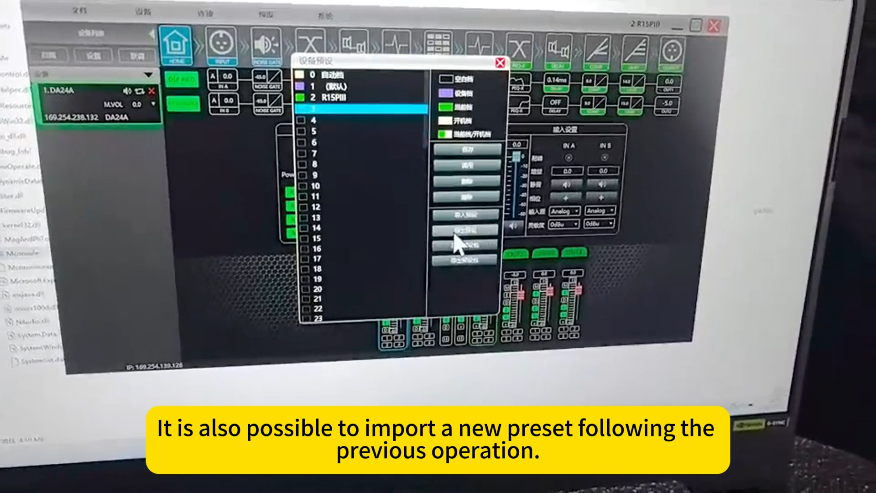
On your laptop, set the Ethernet to auto IP—typically grabs something in the 192.168.1.x range. Launch our control software, hit settings, and select TCP mode. Click OK. When the device pops up with a green icon, double-click to enter the preset menu. Select an existing slot to overwrite, or pick a blank one. Import the factory file tuned for your config—say, one with a high-pass at 80 Hz for the tops and low-pass for the sub. Open the file, then save. Name it venue-specific, like “Theater_80Hz_2dB_Cut_200Hz”. Hit OK, then recall it to load immediately.
This active module preset import shines in practice. In a theater with balcony seating, we import a preset that tilts the EQ: cut 2 dB at 120 Hz to kill room modes from reflective walls. Test with a measurement mic—aim for flat response across 50-100 Hz. For stadiums, boost 50 Hz by 1.5 dB to counter grass absorption; the DSP handles it without taxing the amp. Always verify after import: Play a sweep tone and watch the Clip LED—peaks should hit 136 dB SPL without red.
Wiring ties directly into this. Connect full-range signal to IN A on the LC18P via XLR for the tops feed. Bass line goes to IN B for sub isolation. From FULL RANGE OUTPUT NL4, run to the first LC10’s IN: 1+1- for LF (16 ohms, 250W AES), 2+2- for HF (80W AES). Jumper from LINK to the second LC10’s IN for daisy-chaining—keeps load at 8 ohms total. In ground stacks, position two LC10s on the LC18P platform, secure pins, and angle 5-7 degrees down for 30-meter throws. We’ve done this in arenas where spacing subs 3 meters apart cuts rear bleed by 15 dB.
Debugging during active module preset import? If the green icon doesn’t appear, check cable integrity—a multimeter on pins confirms continuity. In humid outdoor gigs, seal USB ports with tape post-import to avoid moisture. For multi-sub arrays, chain via LINK A/B XLRs; import the same preset across all for uniform phase. Impedance curves help: LC18P holds 8 ohms steady; dips flag issues.
We’ve shaved setup times to 15 minutes per unit with this method. In conferences, import presets with a gentle roll-off above 15 kHz to soften highs in small rooms. For festivals, go aggressive on limiting to protect the 75mm voice coil in LC10 woofers during bass-heavy sets. The Baltic birch enclosures with polyurea finish take the abuse, rated for 0-10 degree rigging under load.
Expanding to full rigs, pair with our MA series amps for passive tops if needed, but the active module in LC18P simplifies things—no external processors. USB access lets you save custom presets on the fly: Boost mids by 1 dB at 300 Hz for vocal clarity in live bands. Recall and test; walk the venue to confirm 100° horizontal coverage without hot spots.
This active module preset import workflow has kept our tours running smooth. In one Hangzhou stadium show, we imported venue-tuned files pre-gig, hitting even coverage for 8,000 seats. It minimizes downtime, maximizes output.
Head to zsoundpro.com for software downloads or contact us for preset files tailored to your space.
Leave a Reply